

How to connect PSA grading to your Pop Stop card purchases
Instead of matching receipts, loose cards and grading paperwork by memory, connect your Pop Stop purchases to PSA card grading through a card-by-card collection register. For PSA card grading NZ collectors can manage in 2026, treat buying, submitting and tracking as separate steps—not as an account integration.
- For psa card grading nz, connect purchase records to PSA submissions through a collection register, not assumed checkout integration.
- Pop Stop is best for NZ fans buying trading cards and pop culture collectables, rather than arranging grading.
- Check PSA eligibility, submission instructions and return arrangements before packing cards.
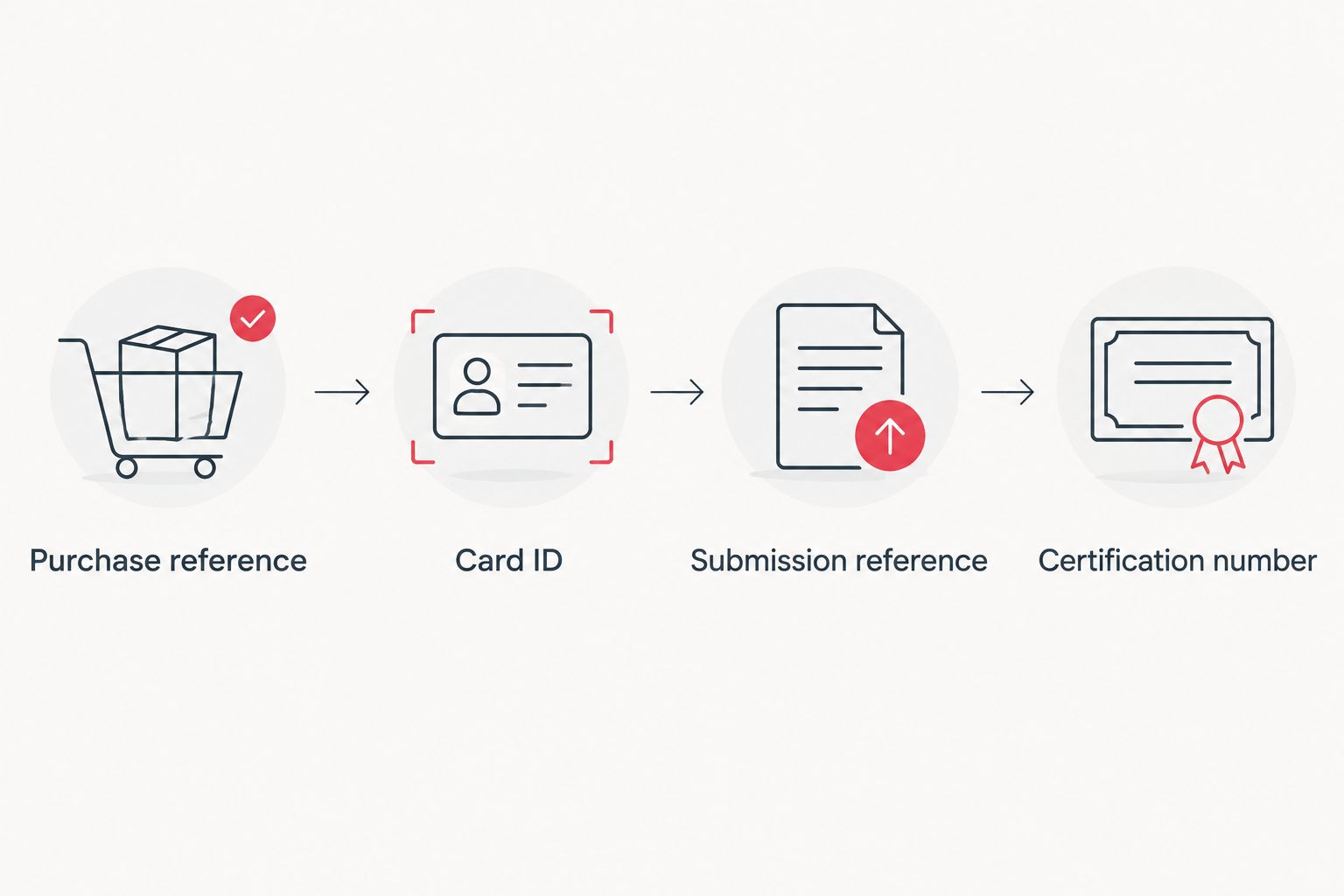
- Keep purchase references, card photographs, submission details and certification numbers together.
Why this matters
Buying a card and submitting it for grading are different transactions. Your purchase record identifies the product you bought; your grading record needs to identify the individual card you send. A booster receipt alone does not distinguish one pull from another.
Pop Stop sells trading cards and collectables. This workflow connects those purchases to your own submission records without assuming a PSA partnership, grading service or automatic data transfer.
Start with how to store trading cards to keep them mint before building a submission pile. Good records help you track a card; careful handling helps you avoid damaging it while you decide what to do.
Before you start
- Gather your records and materials: purchase confirmation, the physical cards, a camera, a spreadsheet or notebook, and protective materials that match the grading provider's current instructions.
- Choose your submission route: check PSA's current submission requirements for New Zealand customers, or obtain written instructions from an intermediary before handing over cards. For a direct submission, confirm the account requirements first.
- Check the easy-to-miss detail: identify each card's exact set, number, language and variant. Similar artwork does not make two cards the same printing, and a purchase confirmation does not prove which card came from a particular pack.
For a 2026 submission, use the instructions supplied for that submission—not an old packing video or another collector's previous paperwork. Confirm international shipping, insurance and return arrangements before you commit.
Purchase and card register
Your register is the link between shopping and grading. The bold labels below are suggested spreadsheet column names that you create, not buttons in either company's website.
- Create one record per card. Add Card ID, Purchase reference, Product, Card name, Set, Card number, Language, Variant and Status. Give each physical card a unique identifier, including duplicates.
- Attach the purchase evidence. Save the receipt or order confirmation and enter its reference. If you cannot establish which purchase produced a particular card, leave that connection unconfirmed rather than guessing.
- Take 2 reference photographs. Photograph the front and back clearly, then name both files with the card's identifier. Keep personal details from receipts out of any photographs you share publicly.
- Record your intention. Use simple status labels such as Keep raw, Review and Submit. Separate cards you enjoy playing from cards you want encapsulated for collecting.
Expected result: every candidate has an identifiable physical card, matching photographs and a purchase reference where you can establish one.
Keep sealed-product records separate from individual-card records. A sealed booster and a card pulled from that booster are different collection items; give each its own description rather than replacing one entry with the other.
Grading shortlist and submission route
Choose cards deliberately; do not treat every fresh pull as a grading candidate. PSA assesses cards individually, and opening a sealed pack does not establish the grade of its contents.
- Inspect 4 condition areas. Check centring, corners, edges and surfaces under clear light. Record visible marks honestly; photographs and personal inspection are not a promised PSA grade.
- Confirm the exact card is eligible. Check the grading provider's current coverage for that card type and any relevant restrictions. Resolve an uncertain printing or variant before completing the submission.
- Choose a route using the table below. Ask who submits the cards, who holds the tracking information, and who arranges the return. Keep the written answers with your register.
- Make a keep-or-submit decision. Consider your collecting goal, the submission terms, transport and the possibility of a disappointing grade. Leave cards raw when encapsulation does not serve your purpose.
| Route | Best for | Advantage | Drawback |
|---|---|---|---|
| Direct PSA submission | Collectors who want to manage their own paperwork | You manage the submission record yourself | You handle the required administration and shipping arrangements |
| Intermediary submission | Collectors who want another business to coordinate submission | A separate provider handles the tasks agreed in writing | You must check that provider's terms, responsibilities and communication process |
| Keep raw | Players and collectors who do not need encapsulation | The card remains accessible for normal collecting or play | You do not receive a PSA assessment or certification number |
Expected result: your shortlist contains identified cards, a chosen route and a clear reason for submitting each card.
For 2026, compare the actual submission terms rather than copying another collector's service choice. A favourite character and a resale-focused submission can justify different decisions.
Submission paperwork and packing
Follow the current instructions from the business receiving your cards. Do not substitute a generic packing method for its requirements.
- Enter the card details carefully. Match each submission entry to your register, including language and variant. Use the receiving provider's current form labels; do not force an uncertain card into the nearest-looking entry.
- Add tracking columns. Create Submission reference, Submission position, Date sent, Outbound tracking and Return tracking in your register. Copy references exactly from the actual paperwork.
- Match the physical order. Arrange the cards in the order required by the submission instructions. Check each against its photograph before closing the parcel.
- Protect and document the parcel. Use the specified holders, packing materials and paperwork. Photograph the prepared contents, retain the shipping receipt, and keep any insurance documentation together.
Expected result: every packed card matches a submission entry, and you can trace the parcel without searching unrelated emails.
Do not clean, press, trim or attempt to repair a card to chase a higher grade. Preserve its condition and disclose relevant concerns through the provider's process. Stop and ask the receiving provider if a holder or packing requirement is unclear.
Return check and collection update
The workflow finishes when the returned card matches your records—not when the parcel arrives.
- Check the return against your register. Match the card name, set, number, language and variant. Compare the returned item with your pre-submission photographs.
- Record the grading outcome. Add Grade, Certification number and Return date. Record an ungraded return accurately rather than leaving it marked as complete with an assumed grade.
- Check the certification record. Use PSA's certification verification service and compare the displayed details with the holder. Investigate a mismatch through the relevant provider before selling or trading the card.
- Record the storage location. Add Storage location so you can find the physical card later. Keep slabbed cards separate from cards waiting for submission.
Expected result: your purchase evidence, photographs, submission record and returned card are connected through one card identifier.
Archive your 2026 submission paperwork with the completed record. Keep it even when the result is lower than you expected; the record should describe what happened, not just the outcome you wanted.
Add new purchases to the same workflow
For repeat Pop Stop purchases, reuse the register rather than building a new tracking system each time. Add individual cards after opening and identifying them, then move only deliberate candidates into Review.
Best for regular collectors: review your shortlist as a batch before starting another submission. This creates a useful decision point without turning every pack opening into a grading commitment.
The trade-off is ongoing record-keeping. Keep entries short enough that you will maintain them, but never drop the details needed to distinguish duplicate cards or different printings.
Troubleshooting
- Your card does not match the submission search result: recheck the set, collector number, language and variant. Ask the receiving provider before selecting an approximate match.
- You have several identical copies: assign separate card identifiers and photographs before packing. Do not rely on memory to distinguish them after submission.
- The grade is lower than expected: compare the result with your original condition notes. A fresh pull or attractive front does not guarantee a particular assessment.
- Tracking and grading progress look different: shipping tracking describes parcel movement, not the grading stage. Use the submission provider's records for submission progress.
- A returned holder has unexpected details: retain the packaging and photographs, check the certification record, and contact the submission provider with the discrepancy.
FAQ
How do I connect Pop Stop purchases to PSA grading?
Connect them through your own collection register, using a card identifier to link purchase evidence, photographs, submission paperwork and the returned card. Do not assume an automatic account connection or grading service is included with a purchase.
Can I submit cards to PSA from New Zealand?
Check PSA's current submission requirements for New Zealand customers before arranging a direct submission. If you choose an intermediary, confirm its responsibilities, shipping arrangements and return process in writing.
Does a newly opened card automatically get PSA 10?
No, a newly opened card does not automatically receive PSA 10. PSA assesses the individual card, so inspect centring, corners, edges and surfaces before deciding to submit.
Should I grade every Pokémon card I pull?
No, shortlist cards according to your collecting goal and their condition. Keep cards raw when you want to play with them or do not need encapsulation.
What should I check before sending cards for grading in 2026?
Check eligibility, identification, current submission instructions and the complete shipping and return arrangements. Resolve uncertain variants before packing the cards.
How do I track cards sent through an intermediary?
Keep your card identifiers alongside the intermediary's receipt and submission reference. Confirm how that provider shares progress and return tracking before handing over your cards.
How do I check a returned PSA card?
Match the card and holder details to your register, then compare the certification number with PSA's certification record. Raise any mismatch with the submission provider before selling or trading it.
One last thing
Photograph duplicate cards separately before they leave your hands. The same name and card number identify a printing, not your particular copy. A distinct card record is what makes this workflow useful when several identical cards return together.

