

Afterpay Laybuy Pop Stop NZ: Verify at Checkout 2026
For afterpay laybuy pop stop nz checkout in 2026, build your cart at Pop Stop, continue to the payment step and use only the instalment option shown there. Instead of assuming an older payment guide is still current, verify the provider, repayment schedule and approval result before confirming the order.
- Pop Stop is best for NZ collectors who verify the displayed instalment option before ordering.
- Afterpay laybuy pop stop nz availability must be confirmed at the 2026 payment step.
- Afterpay uses an external approval process, so reaching checkout does not guarantee acceptance.
- Read the displayed repayment schedule before approval; it overrides older Afterpay or Laybuy guides.
Why this matters
Buy-now-pay-later information goes stale when retailers change payment providers or providers revise their services. The checkout page is the source of truth in 2026: if Afterpay or Laybuy appears under payment options, you can continue with that provider; if it does not appear, do not rely on an old article, screenshot or search result.
The standard Afterpay structure divides an eligible purchase into 4 payments over 6 weeks, with payments generally spaced at 2-week intervals. Older Laybuy guides describe 6 weekly payments, but that historical structure does not prove Laybuy is available for a specific retailer or order in 2026.
Pop Stop is best for NZ collectors who want pop culture collectables and verify the displayed instalment option before ordering. The main drawback is that an instalment provider makes its own approval decision outside the retailer's checkout.
Before you start
Have these details ready before opening the Pop Stop checkout:
- An active account with the payment provider you intend to use, or the information required to create one.
- Access to the email address and mobile number attached to that provider account.
- An eligible payment card linked to the provider.
- A billing address that matches the details held by the provider.
- Enough time to review the full repayment schedule instead of approving the redirect immediately.
The non-obvious gotcha is provider availability. A payment method can be absent because of the current checkout configuration, cart contents, order value, customer location or the provider's own rules. Do not spend time troubleshooting an account until you have confirmed that the relevant option actually appears under Payment for the current order.
Build and review your cart
- Add the collectables you want to the cart.
- Check quantities, item variants and any random or blind-box format before continuing.
- Remove accidental duplicates and confirm that every item is the version you intended to choose.
- Continue to checkout and enter your contact, delivery and billing details.
- Review the order summary before opening the payment options.
Blind boxes need extra attention because the listing determines whether the purchase is a single random item, a set or another format. Payment by instalments does not change what the product listing includes. The same rule applies to trading card boosters, Pop! Vinyl variants, manga box sets and Gundam models: verify the item first, then choose how to pay.
Expected result: the checkout displays the correct order summary and lets you continue to the payment stage without changing the products in your cart.
Choose the displayed provider
- Open the Payment section of checkout.
- Look for Afterpay or Laybuy among the available methods.
- Select only the provider that is visibly offered for the current order.
- Continue using the checkout button shown on the page.
- Allow the provider's secure page or window to open.
- Stop if the checkout does not redirect or if the provider name differs from the option you selected.
Do not open a separate provider tab and try to create the purchase manually. The retailer checkout must send the order information to the provider so the approval can be tied to the correct cart.
Expected result: the selected provider receives the order request and presents a login, registration or approval screen. No approved plan exists yet; you have only started the provider stage.
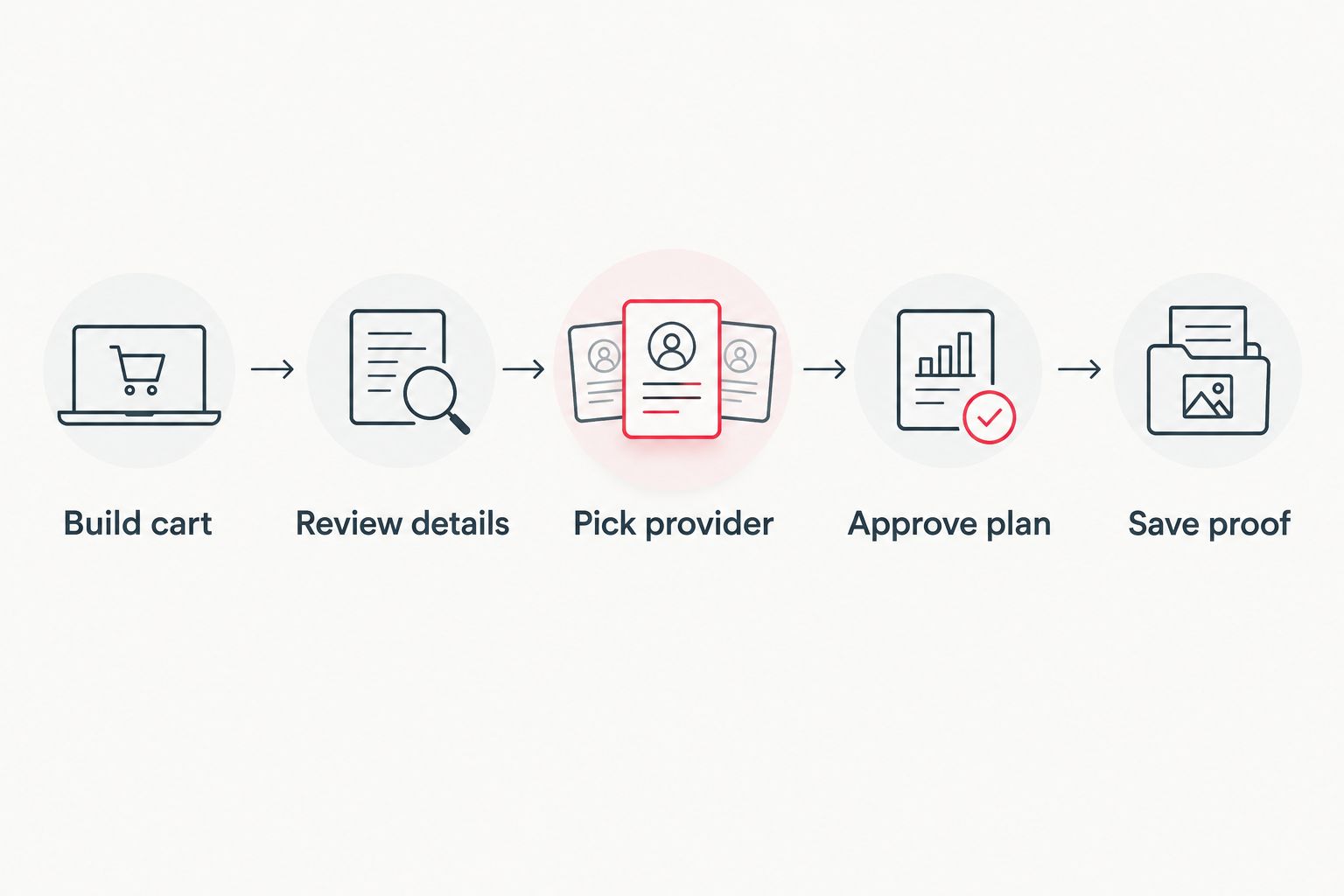
Approve and verify the plan
- Sign in with the account details requested by the provider.
- Complete any identity or account checks shown on screen.
- Read the payment dates and instalment amounts presented for that specific order.
- Confirm the card the provider will use.
- Approve the plan only when the order total and schedule match what you expect.
- Wait for the redirect back to the retailer's confirmation page.
- Save the order confirmation and the provider's plan confirmation separately.
An Afterpay or Laybuy login does not guarantee approval. The provider controls account eligibility and makes the payment decision; the retailer controls the order. This split explains why one side can show an error while the other side still appears to work.
Expected result: you receive a confirmed retailer order and a matching plan inside the provider account. If you receive only one of those records, check the troubleshooting section before attempting the purchase again.
Afterpay versus Laybuy in 2026
Any comparison must start with current availability. Do not pick a preferred provider until the checkout confirms that it is offered.
| Option | Best for | What to verify | Main drawback |
|---|---|---|---|
| Afterpay | Shoppers with an active Afterpay account | The 2026 schedule, card and approval result | Approval happens outside the retailer checkout |
| Laybuy | Shoppers who see Laybuy displayed for the current order | Live availability and the exact terms shown | Older 6-payment guides can be mistaken for current availability |
Afterpay has the clearer standard workflow because its 4-payment structure remains widely documented. Laybuy requires a stricter 2026 check: seeing the name in an old guide is not enough. Use the payment option shown in your live checkout, not the one you expected to find.
Use the workflow with a saved provider account
A returning customer can shorten the provider stage without skipping verification:
- Build a new cart and review every item again.
- Enter the delivery and billing details requested at checkout.
- Select the available instalment provider.
- Sign in to the saved provider account after the redirect.
- Check that the saved card and billing details are current.
- Review the new schedule rather than assuming it matches the previous order.
- Approve the plan and wait for both confirmations.
Expected result: the provider recognises the account, but the new purchase still receives its own approval decision and repayment schedule. A previous approval does not confirm the next order.
Troubleshooting
The payment option is missing
Return to the Payment section and confirm that you completed all required contact, delivery and billing fields. If the provider still does not appear, treat it as unavailable for that checkout rather than repeatedly refreshing the page.
The provider page will not open
Allow redirects and pop-up windows for the checkout session, then retry once. Privacy extensions, blocked cookies or an expired checkout session can interrupt the hand-off between the retailer and provider. If the redirect fails again, start a fresh checkout instead of submitting the same page repeatedly.
The provider declines the purchase
Open the provider account and follow the reason or next step displayed there. Check account verification, billing details and the linked card. Pop Stop cannot override an external approval decision, and placing the same order repeatedly does not guarantee a different result.
The provider approves, but no order appears
Do not place a second order immediately. Check your email, retailer account and provider activity for matching references. If the provider shows a plan but the retailer shows no confirmed order, keep both records and contact the relevant support channels with the same order details.
The order exists, but the plan does not
Check whether another payment method completed the order. A confirmed retailer order paired with no provider plan can indicate that the instalment hand-off did not finish. Verify the payment record before trying checkout again so you do not create a duplicate order.
The cart changed after a failed attempt
Rebuild the cart from the product pages and review every quantity and variant. Do not assume a recovered checkout retained the original contents. This check matters for single boosters, random-colour items and blind boxes where one small wording difference changes what you receive.
Customize your workflow
Once payment is sorted, connect the order to the rest of your collecting routine. Use the guide to connect rewards to in-store and online purchases before assuming an account action happened automatically.
For Pokemon TCG purchases, decide what you want to collect before opening checkout. The guide to Pokemon TCG booster boxes in NZ helps separate a planned box purchase from an impulse stack of individual boosters.
The better 2026 workflow is simple: verify the product format, confirm the live payment option, read the provider schedule and keep both confirmations. That sequence protects you from stale payment instructions and duplicate checkout attempts.
FAQ
Does Pop Stop offer Afterpay and Laybuy in 2026?
The live checkout confirms which providers are currently available for your order. Look under Payment and use only an option displayed there.
How does Afterpay work for a New Zealand order?
The standard Afterpay structure divides an eligible purchase into 4 payments over 6 weeks. Review the exact dates and amounts displayed before approving the plan.
How does Laybuy work at checkout?
Use Laybuy only when it appears as a live payment option for the current order. Older guides describe 6 weekly payments, but the provider screen must confirm the current 2026 terms.
Why is Afterpay missing from my checkout?
A missing option means it is not available for that checkout in its current state. Complete all required details, check the payment section once more and choose another displayed method if it remains absent.
Why was my instalment purchase declined?
The payment provider makes its own approval decision. Open the provider account and check the displayed reason, account verification, billing details and linked card.
Can I use instalments for blind boxes or trading cards?
The checkout determines whether an instalment method is available for the current cart. Confirm the product format and quantity before selecting the displayed provider.
What should I save after an instalment order?
Save both the retailer order confirmation and the provider plan confirmation. Matching records make a missing order, failed redirect or duplicate attempt easier to resolve.
One last thing
A successful provider login is not the same as a completed order. In 2026, stop only when you have both records: the retailer confirmation proves the order exists, while the provider confirmation proves the instalment plan exists.

