

BoardGameGeek Wishlist NZ: Match It to Pop Stop Stock 2026
Checking a BoardGameGeek wishlist against a random assortment of NZ retailer tabs wastes an evening you could spend actually playing. Instead of refreshing marketplace search results every few days, run your BGG "Want to Buy" list through one repeatable weekly check against Pop Stop's board game range, so you know the moment a title lands rather than finding out three weeks late.
- BoardGameGeek has no live stock feed to any NZ retailer in 2026 — matching a boardgamegeek wishlist nz-side is a manual weekly task, not an automated one.
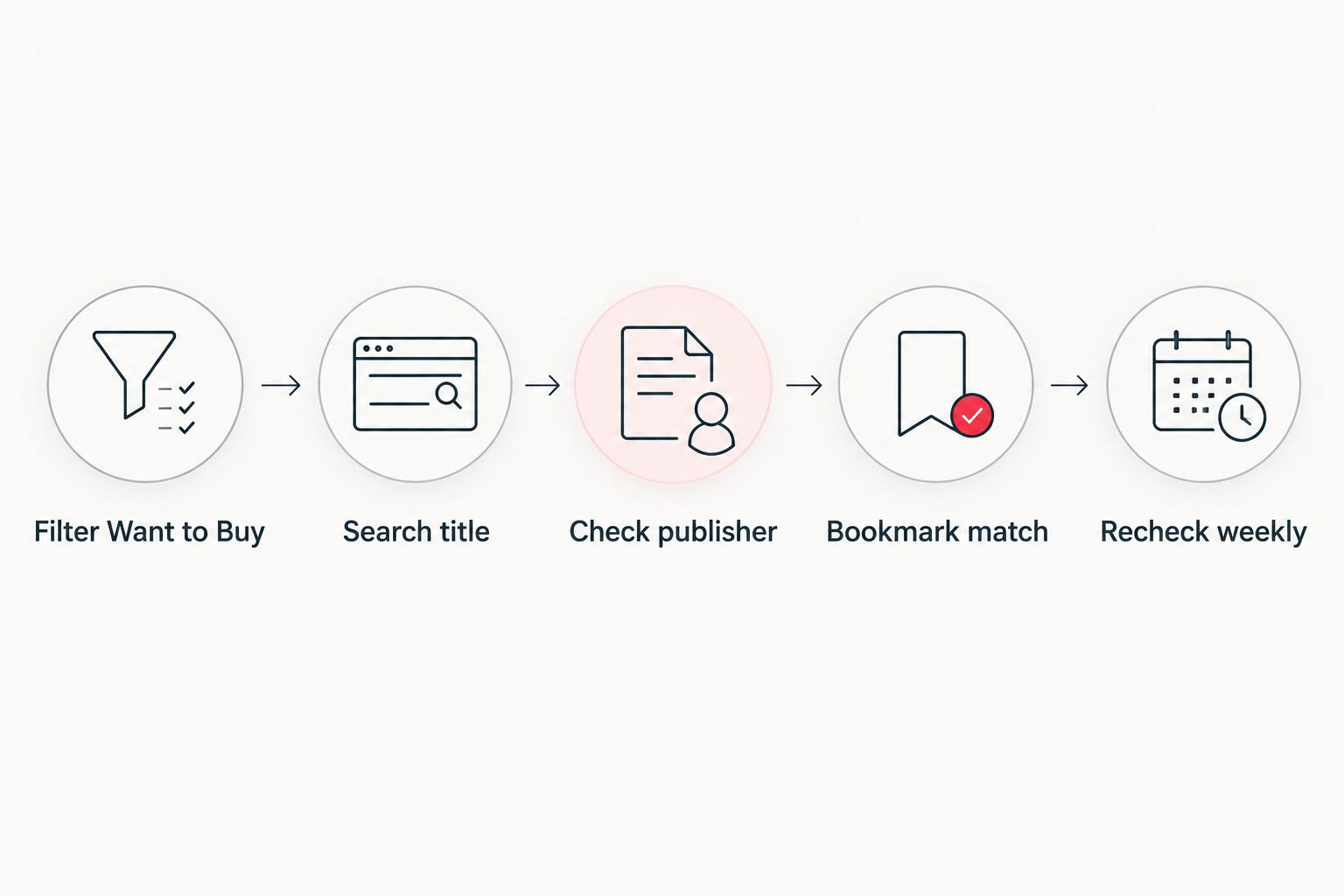
- Filter your BGG collection by Want to Buy status first, then search each title directly on Pop Stop's board games range.
- Match by publisher and edition, not title alone — BGG lists regional reprints as separate entries.
- Bookmark confirmed product pages and recheck weekly since board game stock moves without a public notice.
Why this matters
BoardGameGeek is a database and community tool, not a shopping feed. It has no API partnership with Pop Stop or any other New Zealand retailer, so a title sitting in your "Want to Buy" list tells you nothing about whether it's actually in stock here in 2026. The workaround is a manual cross-check routine, and the difference between doing it well and doing it badly is entirely in how precisely you match titles.
A game like a base set versus its second printing, or an English edition versus an import, can sit as two separate BGG entries but show up as one listing on a retailer site — or the reverse. Get the matching step wrong and you'll either miss a real restock or waste time chasing an edition Pop Stop never carried.
Before you start
- A BoardGameGeek account with titles already logged in your collection under Want to Buy or Preordered status — this only works if that list is current.
- A few spare minutes weekly. There is no live sync between BGG and Pop Stop's stock system, so this is a manual recheck, not a set-and-forget alert.
- The gotcha that catches people early: BGG often splits one physical game into multiple database entries by edition, publisher or region. Matching on title alone in year one of doing this will get you false negatives — always confirm the publisher line on the product page before deciding a title isn't stocked.
Set up your BGG wishlist as a working list
- Log into BoardGameGeek and open your Collection page from your profile menu.
- In the filter panel, set Status to Want to Buy (add Preordered too if you track upcoming releases separately).
- Sort the filtered view by Name so titles are alphabetical — this makes the next step faster when you're working through ten or more games at once.
- Keep this filtered view bookmarked. You'll return to it every week rather than rebuilding it from scratch.
Expected result: a clean, current list of exactly the games you're actively hunting, stripped of anything you've already bought or shelved.
Match titles against Pop Stop's board game range
- Take the first title from your filtered BGG list and search it directly on Pop Stop.
- On any matching product page, check the description against the BGG entry's publisher and edition, not just the box art.
- If the search returns nothing, try the publisher name instead of the exact title — reprints and localized editions get renamed more often than you'd expect.
- Repeat down your list, noting which titles are live, which are a near-miss on edition, and which don't exist on the site at all.
Expected result: your BGG wishlist split into three buckets — in stock now, wrong edition, and not carried.
Set a manual recheck rhythm
- Bookmark the confirmed product pages from step above, not the search results page — search results reshuffle as new stock arrives.
- Add a recurring weekly or fortnightly reminder to revisit those bookmarks, since Pop Stop's board game stock changes without a public notification list tied to it.
- When a title moves from "not carried" to a live product page, treat that as your restock signal and act on it that week.
Expected result: you catch restocks within days instead of stumbling across them months later.
Filter by player count instead of title
If your wishlist is really a flatting or game-night shortlist rather than a fixed set of titles, work from group size instead of exact names. Cross-reference your BGG "Want to Buy" tags against the groupings in board games ranked by player count to see which of your wanted titles suit a two-player flat versus a six-person game night, then search only that subset on Pop Stop rather than your entire list.
This variant is faster when you've got 20+ games logged as "Want to Buy" but only buy two or three a year — it prioritizes the search effort toward what you'll actually use soonest.
“If BoardGameGeek shows a title as Want to Buy with no NZ-style publisher listed against it, treat it as an import and expect a longer wait, not a quick restock.”
Troubleshooting
- Search returns zero results for a title you know exists. Search the publisher or a shortened version of the name — some editions are renamed for the NZ/Australian market compared to the BGG listing.
- Search returns unrelated products (blind boxes, TCG singles). Add "board game" to your search terms to filter out the wider collectables catalogue.
- A title you bookmarked in 2026 has disappeared from the site. Retailers rotate stock; recheck in a few weeks rather than assuming it's gone for good.
- Two BGG entries seem to be the same game. BGG occasionally merges duplicate listings after a publisher correction — refresh your Want to Buy filter monthly to catch these cleanups.
- You can't tell if a listing is the base game or an expansion. Read the product description fully; expansions are usually flagged in the title itself on the product page.
Customize your workflow
Once the stock-matching habit is running, pair it with how you actually collect the game. If you're picking up in person rather than waiting on delivery, line this routine up with click and collect at Pop Stop's NZ stores so a confirmed match turns into same-week pickup instead of a shipping wait.
Check today's board game stock
Search your BGG wishlist titles against the live Pop Stop range.
FAQ
Does BoardGameGeek show live stock for NZ retailers?
No. BoardGameGeek is a database and community site with no live stock feed to any New Zealand retailer in 2026, including Pop Stop. Matching a wishlist to real stock requires a manual weekly check.
How do I find my BoardGameGeek wishlist?
Open your BGG profile, go to Collection, and filter by Want to Buy or Preordered status. This gives you a clean list separate from games you already own.
Why doesn't a title match even though BGG lists it?
BGG often splits one physical game into separate entries by edition, publisher or region. Search by publisher name rather than the exact BGG title if the first search comes up empty.
How often should I recheck my wishlist against stock?
Weekly or fortnightly is enough for most collectors. Board game stock at Pop Stop changes without a public alert list, so a fixed recheck rhythm catches restocks faster than random browsing.
Can I search by player count instead of exact title?
Yes. Cross-reference your Want to Buy list against a player-count grouping to narrow down which titles suit your group size before searching each one individually.
Is it worth bookmarking product pages instead of search results?
Yes. Search results reshuffle as new stock arrives, but a bookmarked product page stays a fixed reference point you can recheck directly each week.
What if a game I want isn't stocked at all?
Some BGG-listed titles are imports or out-of-print editions that NZ retailers don't carry. Treat these as long-term watches rather than expecting a near-term restock.
One last thing
The single biggest time-waster in this whole routine isn't the searching — it's re-searching titles you already confirmed weeks ago because you didn't bookmark the product page itself. Fix that one habit in 2026 and the weekly recheck drops from twenty minutes to five.

